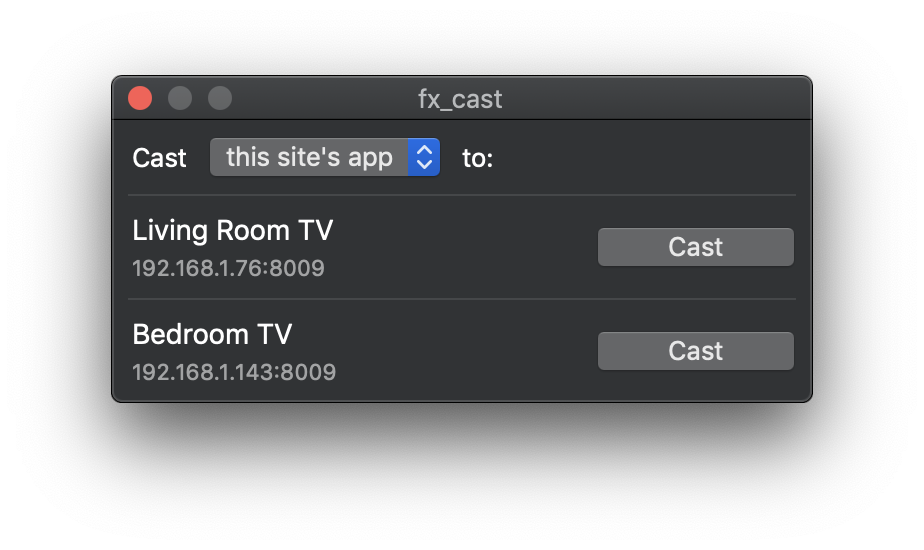
 # fx_cast
Firefox extension that implements the [Chrome sender API](https://developers.google.com/cast/docs/reference/chrome/) and exposes it to web apps to enable cast support.
Communication with receiver devices is handled by a native application (bridge). Check the [implementation notes](IMPLEMENTATION.md) for more info.
**No full public release yet! Pre-release beta version is incomplete and likely buggy.**
## Installing
### Supported platforms
* Linux
* macOS
* Windows
Install the Firefox extension and companion bridge application. These are separate downloads that can be found on the [website](https://hensm.github.io/fx_cast/) or in the [GitHub releases](https://github.com/hensm/fx_cast/releases) section.
macOS/Windows version has an installer, Linux packages can be installed via the command line:
````sh
# Debian/Ubuntu
sudo dpkg -i fx_cast_bridge--.deb
# Fedora
sudo dnf install fx_cast_bridge--.rpm
````
### Package managers
* #### Arch Linux (AUR) - https://aur.archlinux.org/packages/fx_cast/
````sh
yay -S fx_cast
````
## Building
### Requirements
* dpkg (for building deb packages)
* rpm (for building rpm packages)
* macOS (for building macOS installer packages)
#### Installing dependencies
macOS:
````sh
brew install dpkg rpm makensis
````
Debian/Ubuntu:
````sh
sudo apt install dpkg rpm nsis
````
Fedora:
````sh
sudo dnf install dpkg rpm-build mingw-nsis
````
Archlinux:
```sh
sudo pacman -S nvm dpkg
yay -S rpm-org nsis
# Downgrade to node10
echo 'source /usr/share/nvm/init-nvm.sh' >> ~/.bashrc
nvm install 10.12.0
```
### Instructions
````sh
git clone https://github.com/hensm/fx_cast.git
cd fx_cast
npm install
npm run build
npm run install-manifest
````
This will build the ext and app, outputting to `dist/`:
* #### `dist/app/`
... contains the bridge binary and manifest with the path pointing that binary. `install-manifest` copies this manifest to the proper location (or adds its current location to the registry).
* #### `dist/ext/`
... contains the unpacked extension.
Watching ext changes:
````sh
npm run watch --prefix ./ext
````
Launch Firefox and auto-reload on rebuild (run in separate terminal):
````sh
npm run start --prefix ./ext
````
### Packaging
macOS packages can only be created on macOS, Linux .deb/.rpm packages can be built on any platform with `dpkg-deb` and `rpmbuild` binaries, and Windows installers can be created on any platform with the `makensis` binary.
* #### `dist/app/`
... contains the installer package: `fx_cast_bridge--.(pkg|deb|rpm|exe)`
* #### `dist/ext/`
... contains the built extension in the format `fx_cast-.zip`.
Build and package app and extension for current platform:
````sh
npm run package
````
Packaging examples:
````sh
# Linux platforms
npm run package --prefix ./app -- --platform=linux --packageType=deb
npm run package --prefix ./app -- --platform=linux --packageType=rpm
# Windows
npm run package --prefix ./app -- --platform=win32
# macOS
npm run package --prefix ./app -- --platform=darwin
````
##### Package script arguments
* `--platform` `"win32"`,`"darwin"`,`"linux"`
Select the platform to build for. Defaults to current platform.
* `--arch` `"x64"`,`"x86"`
Select platform arch to build for. Defaults to current platform arch.
* `--packageType` `"deb"`,`"rpm"`
Select the package type. Defaults to `deb`. Only relevant when building for Linux.
### Testing
Testing requires geckodriver (or chromedriver for Chrome parity testing). See [selenium-webdriver](https://www.npmjs.com/package/selenium-webdriver#installation) installation instructions (ignore `npm install`).
Test results will be displayed within the opened browser tab.
````sh
npm run build --prefix ./app
npm run install-manifest
npm run package --prefix ./ext
npm test
SELENIUM_BROWSER=chrome npm test
````
## Usage
Most sites won't load the cast API unless the browser presents itself as Chrome. The extension includes a method of spoofing the user agent string, sites can be whitelisted via the options page. Whitelist entries are specified as [match patterns](https://developer.mozilla.org/en-US/docs/Mozilla/Add-ons/WebExtensions/Match_patterns). To whitelist all sites, add `` to the whitelist, though this could cause breakage on random sites.
HTML5 media elements have a "Cast..." context menu item that triggers a sender application. Only works on remote (non-local) media that isn't DRM-encumbered.
Cast-enabled websites will load the sender API shim and display a cast button as in Chrome, provided there are no bugs/incompatibilities with the shim.
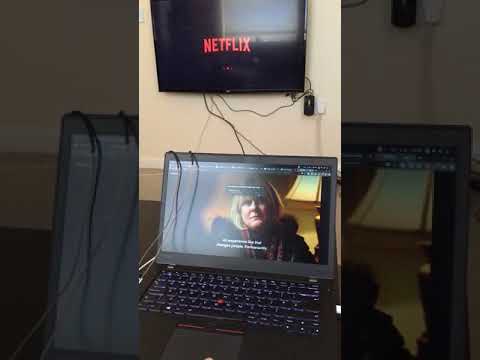
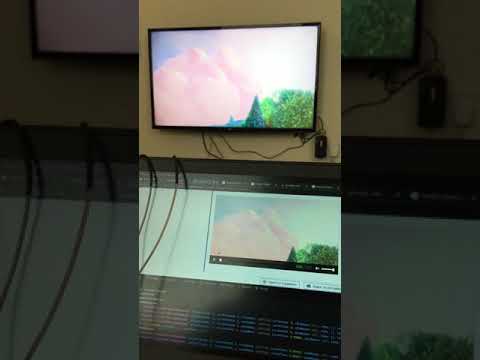
## Video Demos
Netflix / HTML5:
[
# fx_cast
Firefox extension that implements the [Chrome sender API](https://developers.google.com/cast/docs/reference/chrome/) and exposes it to web apps to enable cast support.
Communication with receiver devices is handled by a native application (bridge). Check the [implementation notes](IMPLEMENTATION.md) for more info.
**No full public release yet! Pre-release beta version is incomplete and likely buggy.**
## Installing
### Supported platforms
* Linux
* macOS
* Windows
Install the Firefox extension and companion bridge application. These are separate downloads that can be found on the [website](https://hensm.github.io/fx_cast/) or in the [GitHub releases](https://github.com/hensm/fx_cast/releases) section.
macOS/Windows version has an installer, Linux packages can be installed via the command line:
````sh
# Debian/Ubuntu
sudo dpkg -i fx_cast_bridge--.deb
# Fedora
sudo dnf install fx_cast_bridge--.rpm
````
### Package managers
* #### Arch Linux (AUR) - https://aur.archlinux.org/packages/fx_cast/
````sh
yay -S fx_cast
````
## Building
### Requirements
* dpkg (for building deb packages)
* rpm (for building rpm packages)
* macOS (for building macOS installer packages)
#### Installing dependencies
macOS:
````sh
brew install dpkg rpm makensis
````
Debian/Ubuntu:
````sh
sudo apt install dpkg rpm nsis
````
Fedora:
````sh
sudo dnf install dpkg rpm-build mingw-nsis
````
Archlinux:
```sh
sudo pacman -S nvm dpkg
yay -S rpm-org nsis
# Downgrade to node10
echo 'source /usr/share/nvm/init-nvm.sh' >> ~/.bashrc
nvm install 10.12.0
```
### Instructions
````sh
git clone https://github.com/hensm/fx_cast.git
cd fx_cast
npm install
npm run build
npm run install-manifest
````
This will build the ext and app, outputting to `dist/`:
* #### `dist/app/`
... contains the bridge binary and manifest with the path pointing that binary. `install-manifest` copies this manifest to the proper location (or adds its current location to the registry).
* #### `dist/ext/`
... contains the unpacked extension.
Watching ext changes:
````sh
npm run watch --prefix ./ext
````
Launch Firefox and auto-reload on rebuild (run in separate terminal):
````sh
npm run start --prefix ./ext
````
### Packaging
macOS packages can only be created on macOS, Linux .deb/.rpm packages can be built on any platform with `dpkg-deb` and `rpmbuild` binaries, and Windows installers can be created on any platform with the `makensis` binary.
* #### `dist/app/`
... contains the installer package: `fx_cast_bridge--.(pkg|deb|rpm|exe)`
* #### `dist/ext/`
... contains the built extension in the format `fx_cast-.zip`.
Build and package app and extension for current platform:
````sh
npm run package
````
Packaging examples:
````sh
# Linux platforms
npm run package --prefix ./app -- --platform=linux --packageType=deb
npm run package --prefix ./app -- --platform=linux --packageType=rpm
# Windows
npm run package --prefix ./app -- --platform=win32
# macOS
npm run package --prefix ./app -- --platform=darwin
````
##### Package script arguments
* `--platform` `"win32"`,`"darwin"`,`"linux"`
Select the platform to build for. Defaults to current platform.
* `--arch` `"x64"`,`"x86"`
Select platform arch to build for. Defaults to current platform arch.
* `--packageType` `"deb"`,`"rpm"`
Select the package type. Defaults to `deb`. Only relevant when building for Linux.
### Testing
Testing requires geckodriver (or chromedriver for Chrome parity testing). See [selenium-webdriver](https://www.npmjs.com/package/selenium-webdriver#installation) installation instructions (ignore `npm install`).
Test results will be displayed within the opened browser tab.
````sh
npm run build --prefix ./app
npm run install-manifest
npm run package --prefix ./ext
npm test
SELENIUM_BROWSER=chrome npm test
````
## Usage
Most sites won't load the cast API unless the browser presents itself as Chrome. The extension includes a method of spoofing the user agent string, sites can be whitelisted via the options page. Whitelist entries are specified as [match patterns](https://developer.mozilla.org/en-US/docs/Mozilla/Add-ons/WebExtensions/Match_patterns). To whitelist all sites, add `` to the whitelist, though this could cause breakage on random sites.
HTML5 media elements have a "Cast..." context menu item that triggers a sender application. Only works on remote (non-local) media that isn't DRM-encumbered.
Cast-enabled websites will load the sender API shim and display a cast button as in Chrome, provided there are no bugs/incompatibilities with the shim.
## Video Demos
Netflix / HTML5:
[ ](https://www.youtube.com/watch?v=Ex9dWKYguEE)
[
](https://www.youtube.com/watch?v=Ex9dWKYguEE)
[ ](https://www.youtube.com/watch?v=16r8lQKeEX8)
## Credit
_**Note**: Since it seems to be causing confusion, this project does not use electron. The electron-chromecast library was only used as a reference for the initial implementation of the API shim._
* [electron-chromecast](https://github.com/GPMDP/electron-chromecast)
* [node-castv2](https://github.com/thibauts/node-castv2)
* [chrome-native-messaging](https://github.com/jdiamond/chrome-native-messaging)
* [icons8](https://icons8.com/)
## Donation
### PayPal
To donate via PayPal:
[
](https://www.youtube.com/watch?v=16r8lQKeEX8)
## Credit
_**Note**: Since it seems to be causing confusion, this project does not use electron. The electron-chromecast library was only used as a reference for the initial implementation of the API shim._
* [electron-chromecast](https://github.com/GPMDP/electron-chromecast)
* [node-castv2](https://github.com/thibauts/node-castv2)
* [chrome-native-messaging](https://github.com/jdiamond/chrome-native-messaging)
* [icons8](https://icons8.com/)
## Donation
### PayPal
To donate via PayPal:
[ ](https://www.paypal.com/cgi-bin/webscr?cmd=_s-xclick&hosted_button_id=3Z2FTMSG976WN&source=url)
